Taste Test: Puppet vs Chef vs SaltStack vs Ansible
Smoke Signals vs Smart Phones
Configuration management (CM) tools like Puppet, Chef, SaltStack, and Ansible are so powerful that it's like moving from using smoke signals to communicate to having a smart phone.
That's one of the reasons you will pretty much never hear the companies behind these tools ever bash each other. More than competing with each other, they're competing with people still using rugs over a fire to communicate!

I mean seriously, you'd never let your baby send smoke signals to Grandma. But a smart phone? Go for it!
Huge Wins
Just using any of these tools is a huge win. Having scripted, documented, replicatable servers can speed up your development and operations dramatically.
For example, at one of my consulting gigs we had a System Administrator installing all the software and configuration on the servers by hand!
I asked him how long it would take him to bring up a new application server and he said "Maybe 4 hours." Wow, that's a crazy long time to bring up a new server I thought.
Can you guess how long it actually took him to bring up the new app server? 2 weeks.
That's right. 2 whole weeks.
Insanity.
It went like this:
- He'd install stuff and be "done"
- QA would test it and it would break
- He would remember something he forgot
- QA would test it and it would break
- He would realize he misconfigured something
- QA would test it and it would break
And on and on for 2 weeks.
That was just for ONE server! They were about to launch a major application to millions of users with a huge marketing campaign and they would soon need to bring up at least another 20 servers in a few weeks.
So, we used Puppet and scripted the server.
Now how long did it take to bring up a new application server from scratch? Under 5 minutes.
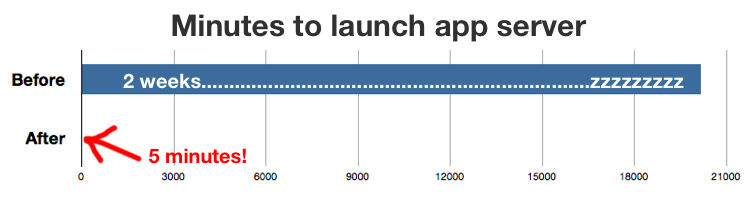
In case you didn't do the math, that's over 4000 times faster!
Finally they could scale.
Also, magically, a ton of weird inconsistent bugs they were experiencing went away. Why? Because all the servers were consistent for the first time EVER.
How this book helps you
If you aren't yet using one of these tools, this book will help you quickly decide.
If you are using one of these tools already, but found it painful for any reason, this book will give you a good taste of what the other tools are like so you can decide which one to move to.
Either way, it could take weeks to properly try out the tools and come to a decision. This book saves you much of that time and effort so you can just see what they are each like and make a decision.
If you value your time, it's a great investment.
What readers are saying...
"Fantastic read! It was positively enlightening!
I had zero experience with CM tools, and this book was just the introduction I needed. I was able to understand the goals of the project, and then see how truly limited shell scripts are as compared to CM tools.
The concision is really great too - straight to the point, and no dilly-dallying!"
-Daniel de Haas
"This book was exactly what I needed. A clear comparison of configuration management tools. It concisely covers the good, the bad, and the ugly of all 4 of these CM tools pointing out the pitfalls you might fall in with each. Matt's recommendations surprised me a bit, but he clearly explained the choices and saved me a ton of time. If you deal with system configuration at all, you want this book."
-Joel Hooks
"Taste Test is a must have to anybody who would like to implement configuration management tools on their systems. I quickly found the information I needed to decide which tool corresponds to my needs. I'm going to start using one of them this week!"
-Damien Goujard
"Damn, it does a marvelous job of letting you quickly try out the CM tools. I wish this had been around six months ago, it would have saved me at least 20 hours!"
-JP Richardson
Book Details
The book started off at over 300 pages, but it has been heavily edited down to about 140 pages to give you a nice streamlined experience. More than half the development time went into removing less critical content and testing with over 30 reviewers so that it would be a tight and pleasant experience for you.
For each tool, I take you through a super simple project where we set up 2 servers, one that hosts a picture of a puppy and one that hosts a picture of a kitten. We set it up in such a way that I'm able to show you some of the key features of the tools. Sound trivial? Well, it really depends on which CM tool used...
I was very surprised at the results, and you might be too.
To see the exact project we use, here's a sample chapter where we first set up the project via shell commands: Shell Script Sample Chapter
Table of Contents:
- Intro
- Shell Script
- Pre Tool Setup
- Tool: Ansible
- Tool: SaltStack
- Tool: Chef
- Tool: Puppet
- Bonus: Where Docker Fits In
- Bonus: CM Tool Security
- Bonus: CM Tool Communities
- Conclusion
The book is not deeply technical, but you should have some development experience and be comfortable with the Linux command-line.
It's in PDF format with a linked Table of Contents for easy navigation as well as handy chapter links after each chapter.
For convenience, I also include a code package for all the commands used to set up and try out the CM tools. This is particularly helpful so you don't have to copy and paste from the PDF.
This book is not for you if:
- You are managing Windows servers (we focus on Linux)
- You already have a religious passion for a particular CM tool
This book is for you if:
- You're not religious about the software you use
- You care about having simple, solid, secure systems
Purchase Options:
No longer for sale since it's out of date and I currently have no plans to update it. The summary is basically, "use Ansible" since it's the simplest to use and has plenty of power to do almost anything you want. If you really really want an old copy, email me :))